Questions this page answers
How fast does a subtitle line need to be read?
◆ The only published rule in this family is about space, not speed: one of the 21 readable pages prints “Subtitles should be less than 42 characters per line and no more than 2 lines per subtitle block for the best readability on all devices.” One other page names reading speed — “Intelligent CPS Management” — and prints no number beside it. ◆ We can put a number on what the export does. Across five deliveries of the same 52.049 s of speech the fastest cue ran 15.38, 15.64, 16.92, 19.10 and 15.38 characters a second. The two rows that went up are the two that were cut short: the same voice at the same speaking rate, read 24.2% faster on the 10.000 s file than on the full one, because a shorter file has fewer cues to average a burst over.
Does a smaller or lower-sample-rate file change the words?
◆ Almost not at all, in this measurement. The 16 kHz at 24 kbit/s copy is 156,608 bytes against 625,580 — 4.0× fewer for the same duration — and it returned 135 words, the same count as the master. Aligned against the reference, the master has 9 differences and the 16 kHz file 10: eight are shared, and the extra one is grave becoming gray, in the middle of a 135-word transcript. The other visible change is punctuation — mr in the master against Mr. with a full stop in the smaller file. A one-word difference sits inside the ±2 word band this recogniser shows on identical input.
What happens to the subtitle file if the recording is cut short?
◆ The words are proportional and the reading speed is not. The 20.000 s cut returned 9 cues and 61 words at 16.67 characters a second median; the 10.000 s WAV returned 5 cues and 34 words at 18.87 median and 19.10 at the fastest single cue. Nothing was re-transcribed differently — the burst that straddles the last boundary simply gets counted in a shorter window, so the same speaking rate reads as a faster caption. The longest line falls at the same time, from 41 units to 39 then 34: less audio gives the wrap rule less to do.
Is a bigger source file a better subtitle file?
◆ No, and the size difference runs the other way from what a page would imply. The 10.000 s 24 kHz 16-bit WAV is the largest delivery of the five at 480,078 bytes — 48,007.8 bytes per audio second, 8.0× the master — and it produced the smallest subtitle file of the five, 355 bytes, because it is the shortest recording. The full-length master's export is 1,424 bytes for 52.049 s, which is 0.23% of the recording. ◆ Delivery format does not decide the weight of a caption file; the length of the recording does, and nothing else on this page gets close.
Where is the threshold where a subtitle maker drops a word?
◇ Nowhere on the pages that rank for this phrase. 0 of the 21 readable pages contains ground truth, reference transcript, word error rate, WER, sample size, test set or validation set, and 0 of the 21 states a minimum word count, a minimum segment length or a confidence cut-off below which a segment is discarded rather than shown. The one page that prints timecodes from its own output shows 2 cues and neither carries a threshold. ◆ In our own five runs every dropped or added word is a recognition decision, not a deletion rule: the counts per file are 135, 135, 61, 34, 135 words against 135, 135, 61, 34, 135 reference words for the same stretches of audio, so no cue was removed for being too short or too unsure.
Do the pages that rank for subtitle maker say how accurate they are?
◇ Six of the 21 print a figure in the high nineties and none of the six attaches a count. One says “95%+ word accuracy on clear audio in major languages — comparable to paid services like Rev or Otter” and prints it five times. Another prints 99% for human subtitles and 85–95% for the automatic ones on the same page. A third prints 99.9% in its title and 99% in its body. A fourth prints “99% Accurate” in the title and again in a stat tile. 0 of the six gives the recording, the language, the number of words or the errors behind the number. ◆ Ours: 9 differences in 135 words on the master, 6.67%, and one of those nine is our own reference being out of date rather than the recogniser being wrong.
Five deliveries, one master, and the file a subtitle maker hands back
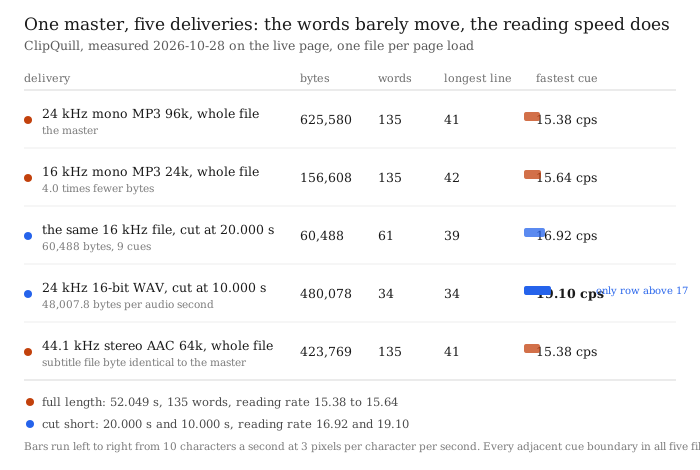
◆ The reading rate rises in the two cut rows and the reason is the length of the file, not a different model. The page transcribes in 30-second windows and then spreads each window's text over that window, so the words per second of speech do not change when the file is cut — what changes is how many cues the burst at the end has to be divided between. The 10.000 s file ends on a burst that the full file shares with a longer neighbour, which is why its fastest cue reads 19.10 characters a second against the master's 15.38 — 24.2% faster on the same voice at the same speaking rate.
◆◆ The two full-length rows are the opposite finding. 16 kHz at 24 kbit/s carries 4.0× fewer bytes and samples at two thirds of the master's rate, and the export still returns 135 words; the 44.1 kHz stereo AAC file samples at 1.84× the master's rate in two channels and returns a subtitle file byte-identical to the master's, same sha prefix 056e9fb6a53d4f51. What moves between delivery formats is not, in this measurement, the words.
What the 21 pages behind these two phrases print, and what they do not
- ◇ Two searches, 30 slots, 26 distinct URLs, 25 hosts. Brave, top ten per phrase, taken 2026-10-28. Four hosts hold two slots each — Canva, Choppity, Kapwing and Caption X — and 4 of the 25 appear under both phrases. 21 of the 26 URLs could be read: adobe.com and quillbot.com returned HTTP 403 at a Chrome user agent and again at Safari, a Google Play listing and an App Store listing are store pages rather than articles, and a Reddit thread is a discussion. Every denominator below is 21.
- ◇ The file is sold; the file's shape is not described. 13 of the 21 mention SRT or VTT. One of the 21 prints a line-length rule — Clideo's “Subtitles should be less than 42 characters per line and no more than 2 lines per subtitle block for the best readability on all devices.” One of the 21 names reading speed at all — Happyscribe's “Intelligent CPS Management”, one line in a feature list — and that page prints no number next to it. None of the 21 prints a minimum cue duration, a maximum cue duration, a gap rule or a characters-per-second target.
- ◇ Nothing about the threshold where the recogniser stops keeping a word. 0 of the 21 contains ground truth, reference transcript, word error rate, WER, sample size, test set or validation set. 0 of the 21 states a minimum word count, a minimum segment length, or a confidence cut-off below which a segment is discarded rather than shown. The one page that shows a worked SRT example — SpeechText's subtitle editor, the only page among the 21 that prints timecodes from its own output — shows two cues and neither carries a threshold, a minimum or a confidence.
- ◇ Six pages print a high-nineties accuracy figure and none of the six attaches a count. Choppity says 95%+ five times and, in its own FAQ, “95%+ word accuracy on clear audio in major languages — comparable to paid services like Rev or Otter”. Happyscribe's subtitle page prints 99% for human subtitles and 85–95% for the automatic ones. VEED prints 99.9% in its title and 99% in the body. Kapwing's title is “99% Accurate” and so is one of its stat tiles. 0 of the six gives the recording, the language, the number of words or the errors behind the number.
- ◇ Three pages mention speaker labels; none says what happens to the words when it cannot tell who is speaking. Choppity's “optional speaker identification”, Kapwing's speaker line, and SpeechText's cue instructions are the whole of it. 0 of the 21 says whether an unidentified voice is merged into the previous speaker, dropped, or shown unlabelled.
- ◇ Two of the 21 are not subtitle tools at all. Teleprompter.com sells Instagram post captions — a line of text under a photo — and ranks for caption generator anyway. 0 of the 21 says before the fold which of the two jobs the word refers to, which is why every count on this page is about the video file.
Counts are over the pages we could read on one day. Where a page returned 403, a store listing or a discussion thread, we say so and leave it out rather than guess. Every signal below was checked in context before it was counted, because a substring hit is not a statement.
The five deliveries, row by row
| Delivery | Bytes | Cues | Words | Longest line | Fastest cue | SRT size |
|---|---|---|---|---|---|---|
| 24 kHz mono MP3 96 kbit/s, whole file | 625,580 | 20 | 135 | 41 units | 15.38 cps | 1,424 B |
| 16 kHz mono MP3 24 kbit/s, whole file | 156,608 | 20 | 135 | 42 units | 15.64 cps | 1,432 B |
| the same 16 kHz file, cut at 20.000 s | 60,488 | 9 | 61 | 39 units | 16.92 cps | 635 B |
| 24 kHz 16-bit WAV, cut at 10.000 s | 480,078 | 5 | 34 | 34 units | 19.10 cps | 355 B |
| 44.1 kHz stereo AAC 64 kbit/s, whole file | 423,769 | 20 | 135 | 41 units | 15.38 cps | 1,424 B |
One file, one page load, one run each, in this order, on 2026-10-28. Cue durations on the three full and near-full rows run 1.18 to 3.72 s; every adjacent cue boundary in all five files is 0.000 s, so there is no gap to check. Line width is measured per rendered line in display-width units, with a full-width character counting two — the five files are all Latin text here, so characters and units coincide.
What changed between the rows, and what did not
- ◆ 4.0× fewer bytes, one word different, and the punctuation changed direction. The 16 kHz file is 156,608 bytes against 625,580: 3,008.9 bytes per second of audio against 12,019.1. Comparing the two transcripts by dynamic-programming alignment puts 9 words wrong on the master and 10 on the 16 kHz file, out of 135 — 6.67% against 7.41%. Eight errors are the same in both. The extra one is grave becoming gray. Each of the four mr tokens is lower-case and unpunctuated in the master and Mr. with a full stop in the 16 kHz file.
- ◆ The longest line went up, not down. Master 41 units, 16 kHz file 42 — the wrap budget, reached. Both are inside the rule the one page prints, and both are the same 25 rendered lines over 20 cues, 5 of them two-line. A one-word change is enough to move the point where a line breaks, and the file that got the extra word is the one that hits the ceiling.
- ◆ Half the audio, the same reading habit, a faster burst. The 20.000 s cut returns 9 cues and 61 words at 16.67 characters a second median. The 10.000 s WAV returns 5 cues and 34 words at 18.87 median and 19.10 at its fastest. Both are the same voice at the same speaking rate; what differs is where the file stops. The 10.000 s cut ends on a 1.59 s cue (8.41 → 10.00) that carries six words, which is a speaking rate the speaker did not use — the page has to finish the sentence inside the audio that remains. The 20.000 s cut ends on a 1.87 s cue with five words, and the two full-length files end on 1.18 and 1.19 s cues with two.
- ◆ 48,007.8 bytes per audio second buys nothing. The WAV is the loudest delivery of the five by size — 8.0× the master — and its export is the shortest subtitle file, 355 bytes, because it is the 10-second one. Size of the input and size of the output are not related in any direction that helps an editor.
- ◆ A subtitle file is small enough that delivery format does not decide its weight. The master export is 1,424 bytes for 52.049 s — 0.23% of the master recording. The 16 kHz export is 1,432 bytes. Eight bytes apart, for recordings 469,000 bytes apart.
- ◆ Two files gave back the identical subtitle file. The 44.1 kHz stereo AAC file exports sha prefix 056e9fb6a53d4f51 and the master exports sha prefix 056e9fb6a53d4f51. Their decoded PCM is not identical: the AAC path measures 10.34 dB of signal-to-noise against the master once both are decoded to 16 kHz PCM, while a 16 kHz native AAC at the same bit rate through the same decoder measures 38.70 dB. The recogniser returned the same characters over a signal difference of that size, which is the one genuinely surprising result in this batch.
Why the reading rate is the number to look at, and why the pages do not give it
◇ The one published rule in this family is about space: 42 characters, two lines, from a page whose own FAQ answers “for the best readability on all devices”. That rule constrains how much text is on screen at once. It says nothing about how long the text stays on screen, and the two constraints pull in opposite directions — the tighter you wrap, the more cues you need, and every extra cue is another chance for a burst to land on a boundary and be read faster than the last one. Our own 42-unit wrap does exactly that: on the 2026-10-26 file it split 7 cues and left the busiest second untouched at 15.38 characters a second.
◇ The page that names reading speed is the only one that thinks about it at all, and it names it as a feature rather than a target. ◇ Of the other 20 pages, the ones that mention the export sell it and stop there. ◆ We can put a number on what the export does, and the number that moves most across the five deliveries is the reading rate: 15.38, 15.64, 16.92, 19.10, 15.38. If you are choosing a subtitle maker, that is the column to ask for, and a page that sells SRT without it is selling you a file whose speed you will find out later.
What these numbers do not cover
- ◆ One recording, one voice, one language. The 52.049 seconds are six clips from a public read-speech set spliced into one master and re-encoded to 24 kHz mono MP3 at 96 kbit/s. One English speaker, two of the clips are digitally clean and four carry noise. Nothing here is about who is speaking, or about a second speaker in the same file.
- ◆ Two of the five rows are cut, and that is the point of them. The 20.000 s and 10.000 s files stop mid-sentence on purpose. Their word counts are scored against the first 61 and first 34 reference words, not against the whole master, and their error percentages are not comparable with the two full-length rows.
- ◆ The 10.34 dB is a decoding comparison, not a recogniser measurement. It says the 44.1 kHz stereo AAC round trip does more to the waveform than the 16 kHz path does. It does not say the recogniser heard a worse signal in any way that mattered, and the identical subtitle file is evidence it did not.
- ◆ One run per file, and the first run is cold. The five runs took 52.3, 34.0, 14.5, 10.4 and 29.0 seconds wall clock. The first carries the 63 MiB model, which is cached for the rest. Timing is a single observation per row and this page draws no conclusion from it.
- ◆ The 42-unit figure is borrowed, not a standard. It is Clideo's number and this site's wrap budget; nobody here can cite an industry body for it. In these five files the text is Latin, so display width and character count coincide — which means this page says nothing about what 42 units means in Japanese, Korean or Arabic.
- ◆ The 9-error baseline is partly our own fault. One of the nine differences is our reference text saying rocky where the recorded voice says waukee. The baseline is quoted as measured, not as a claim about the recogniser's true accuracy.
- ◆ We did not run any of the 21 pages. Nothing was uploaded to Canva, Choppity, Kapwing, Caption X, Clideo, Happyscribe, VEED, Clipchamp, Animaker, SpeechText, CapCut, Powtoon, Captions, Hootsuite, Wayin, Teleprompter or Aegisub. Their numbers are quoted as claims, not reproduced.
Try it on your own recording
The transcriber is on the front page of this site and on this one. It reads the file in your browser tab, so nothing is uploaded, and the ceiling is 30 minutes of audio and 512 MiB per job. The first run spends about 84.5 MiB on the model and a 21.5 MiB runtime; after that, measured here on 2026-10-28, 52.049 s of speech took 34.0 seconds warm with the 16 kHz file and 29.0 with the stereo AAC one. What you get back is timestamped text that wraps at 42 display-width units a line, exported as TXT, SRT or VTT — a separate caption track, not a re-rendered video — and there are no speaker labels, because we do not do speaker separation. The export for this master is 1,424 bytes; if a page tells you the subtitle file is where the size went, it is not.