◆A transcript editor is two half-jobs, and only one of them touches the sound
◆◆The words and the recording are two different objects. A transcript editor edits text that came out of a recogniser. The audio is not re-recorded, re-encoded or re-rendered, so nothing you type can move a cue boundary: the timings in the file are the ones the recogniser chose, and your edit only decides how much text sits between them. That is why an edit that reads fine in the editor can read badly on screen — the editor shows you words, and the screen shows you words per second.
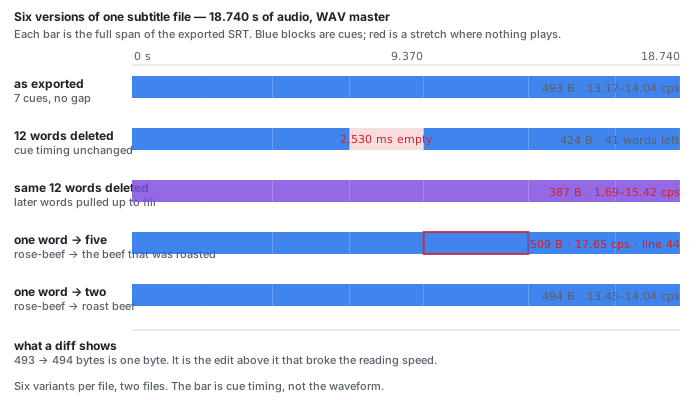
◆◆Delete a cue's words and you keep its 2,530 milliseconds. We removed 12 of the 48 words in an exported SRT and left every remaining cue at its original start and end. The result is six cues where there were seven, and 2,530 ms — the whole life of the cue that went — during which the subtitle area is empty and the audio is not. The exported file shrank by 69 bytes, so a diff shows work happened; it does not show that a reader now sits through two and a half seconds of nothing.
◆◆Reflow the same deletion and the hole becomes a speed. Take the identical 12 words out and pull every later word up so the cues stay full. No gap survives, and the exported file is the smallest of the six, 106 bytes lighter than the one we started from — 387 bytes against 493. What replaces the hole is worse to read: one cue is left with the single word “mind.” and runs at 1.69 characters per second, while the cue that absorbed the pulled-up words runs at 15.42 — a 9.12× spread inside one file that was a flat 13.17–14.04 before the edit. Neither mechanism is wrong. Choosing one without knowing which you chose is.
◇◇Substituting is the same problem from the other side. Replacing rose-beef with the beef that was roasted — one word for five — keeps every cue where it was and pushes one line to 44 display units and its cue to 17.65 cps; on the 16 kHz MP3 the same edit reaches 59 units and 18.38 cps. Replacing it with roast beef — one word for two shorter ones — lands at 40 units and 13.45–14.04 cps, which is the file you started with, one byte heavier.
Search result pages read 2026-11-05, one page of results per phrase, five phrases. Nothing here is a traffic estimate, and the volumes for this set were not supplied to us, so none are printed.
Questions this page gets asked
Does editing a transcript change the audio?
No. Deleting a word, correcting a spelling or adding a sentence changes the text, and the recording stays the sample-for-sample what it was. That is the whole point of a text-based editor and it is also the trap: the subtitle cue grid comes from the recogniser, not from your edit, so the editing cannot move a single cue boundary. On 2026-11-05 we deleted 12 words from an exported SRT and the file kept all 2,530 milliseconds — the full life of the cue it had emptied — during which nothing on screen says anything.
Why does deleting a few words make a subtitle file look wrong?
Because a cue boundary stays at the same millisecond while the words behind it get thinner, and the words behind every later boundary get thicker. On the 48-kHz WAV master, deleting 12 of 48 words moved the reading speed from a flat 13.17 to 14.04 characters per second to 1.69 to 15.42, a spread of 9.12 times between the slowest and the fastest cue in one file.
What happens to the subtitle timing when a word gets replaced by more words?
The cue gets denser, not longer. Replacing rose-beef with the beef that was roasted pushes the cue to 17.65 characters per second on the WAV master and 18.38 on the 16 kHz MP3, and the line inside it to 44 and 59 display units, against a 40-unit line in the version you started from.
Is a short diff of the file size a sign the subtitle is fine?
Not the one we broke. Replacing rose-beef with roast beef takes the file from 493 to 494 bytes, a single byte, and the geometry is unchanged. Replacing it with the beef that was roasted takes the same cue to 44 display units and the file to 509 bytes, 16 bytes larger. The two edits sit 15 bytes apart in file size and do nothing alike to the cue that carries them, which is the whole point of the two rows.
Do transcript editors tell you they changed cue timing?
None of the 42 readable pages we fetched for five transcript-editing phrases did on 2026-11-05: 0 of 42 prints the word cue, 0 of 42 prints a cue count, 0 of 42 prints a reading speed or a line-width limit, and 0 of 42 describes a reflow, where later words are pulled up to close the hole an edit left. Eleven of 42 offer SRT export and none of them says what the SRT will look like.
Is my audio uploaded to be edited?
No. The recogniser runs inside the browser tab and the file is never sent anywhere. The model is 63 MiB plus a 21.5 MiB runtime, downloaded once and cached. This page transcribes and exports SRT or VTT; it does not edit an SRT you already have, and it does not put the audio back together after you delete a word.
What the 42 pages that rank for these phrases print
Five searches on 2026-11-05 — audio transcript editor, edit transcript like a document, transcript editing software, each run twice — returned 75 result positions covering 50 distinct pages on 43 hosts. All 50 were fetched; 8 answered with a block page, a paywall stub or a body too thin to count, leaving 42 with text worth reading. Every fraction below is out of those 42, and every zero was checked by printing the matching lines and reading them.
| what a page could print | pages that do | what the set actually says |
|---|---|---|
| ◆prints the word cue at all | 0 of 42 | not in a heading, a table, a tooltip, an FAQ or the prose of any of the 42 |
| ◆prints how many cues its own export produces | 0 of 42 | no page in the set gives a cue count, a subtitle-block count or an average cue length |
| ◆prints a reading speed, in cps or characters per second | 0 of 42 | the phrase exists on 5 of the 42 only in the sense of “reads quickly” |
| ◆prints a line-width limit, in characters or display units | 0 of 42 | no page gives a number of characters per line; “one line” appears once, in a newsletter signup |
| ◆describes a reflow, or says the timing is retimed | 0 of 42 | no page says what happens to a cue when its words are deleted |
| ◆carries an amended / amendment note on its own transcript | 0 of 42 | no page tells a reader what changed after publication, so no page tells a reader what an edit did |
| ◆says the audio is unchanged by an edit | 0 of 42 | the set does not have the sentence; what it has is the export list, offered as if the file were the thing that matters |
| offers SRT export | 11 of 42 | always as an item in a list: “Export as DOC, PDF, SRT, VTT, JSON, or CSV” |
| mentions time stamps | 16 of 42 | mostly as a product feature, once as a standard transcript convention |
| prints an accuracy percentage | 11 of 42 | between 85% and 99%, and the figure is the product's, not a measurement of the file you dropped |
| ◆gives a denominator under it | 0 of 42 | no page in the set uses WER, a reference transcript or a sample size |
Read the middle column down: the set can name every export format and cannot say what is inside one. Six rows are zero, and the ones that matter are the two mechanisms — cue count and reading speed — because those are the two things an edit moves.
What each fraction was counted from
◆Zero of the 42 print the word cue, in any sense. What they print instead is the format: “Export as DOC, PDF, SRT, VTT, JSON, or CSV”, which names the file and stops there.
◆Zero of the 42 print a reading speed. Five pages use the words reads quickly about a transcript, which is a claim about a person, not a measurement of a cue.
◆Eleven of the 42 offer SRT and none prints a cue, a line or a second of timing next to it. The closest is one editor that says exports “reflect all your edits” without saying what reflecting an edit does to a timing.
◆Eleven of the 42 print an accuracy figure and none says how many words it was measured on. Our own runner prints the denominator: 48 reference words in the WAV file, 49 in the MP3.
The numbers this page is built on
| what | WAV master (48 kHz) | MP3 (16 kHz, 24 kbit/s) |
|---|---|---|
| source | 18.740 s, 1,799,118 bytes, PCM 16-bit mono | 18.740 s, 56,708 bytes |
| as exported | 7 cues, 8 lines, longest 40 units, 13.17–14.04 cps, gap 0, 493 B | 7 cues, 8 lines, longest 39, 13.40–14.10 cps, gap 0, 495 B |
| ◆12 words deleted, cue timing unchanged | 6 cues, 2,530 ms gap, 41 words left, 424 B | 6 cues, 2,520 ms gap, 42 words left, 426 B |
| ◆same 12 deleted, later words pulled up | 6 cues, no gap, 1.69–15.42 cps | 6 cues, no gap, 3.24–17.86 cps, 45-unit line |
| ◆rose-beef → the beef that was roasted | 44-unit line, 17.65 cps, one line over 42 | 59-unit line, 18.38 cps |
| ◆rose-beef → roast beef | 40-unit line, 13.45–14.04 cps | 44-unit line, 13.64–14.10 cps |
| wall clock, five full runs | 64.0 / 42.5 / 32.8 / 34.0 / 19.6 s for 18.7 s of audio | 48.8 / 19.7 / 15.9 / 13.6 / 14.3 s |
| output stability | five runs, one file: 48 words, SRT 493 B, SHA-256 b3e93e23 | five runs, one file: 49 words, SRT 495 B, SHA-256 1b5c0919 |
Six variants per file, twelve rows in all, computed from the exported SRT text. The CSV keeps the cue timings the recogniser produced; each edit only moves words between those boundaries. Wall clock is the harness on this machine, not a property of the file.
Seven rows, read one at a time
◆2,530 ms is not an average: it is the exact life of cue four, 7.410 to 9.940 seconds in the WAV file, and 3.570 s of audio is what the edit left nobody saying anything over. The MP3's cue four ran 7.370 to 9.890, which is 2,520 ms, and that is why the two files give two different holes.
◆15.42 ÷ 1.69 = 9.12. Twelve words out of 48 changed how fast a reader is asked to go by a factor of nine, inside eight cues that never moved.
◆44 − 40 = 4. One substitution added four display units to the longest line and took the count of lines over the 42-unit budget from 0 to 1.
◆On the edge of the budget, 44 − 42 = 2: the substitution did not cross the line by a lot, it crossed it at all, and the count of over-budget lines went from zero to one.
◇The cue count after an edit is not “seven minus one” in both mechanisms: keeping the timing drops a cue, reflowing keeps six because it refills each cue with its original word count and drops only the ones left empty.
◇The duration range never moves: 2.27 to 3.57 s on the WAV file in all six versions, because no edit on this page writes a timestamp.
◇The 16 kHz MP3 and the WAV master agree on the shape and disagree on the width: see the transcription benchmark for how the same audio behaves across files.
What an edit does to a subtitle file, edit by edit
| the edit | what happens to the cue grid | what a reader sees | what to do about it |
|---|---|---|---|
| delete a word or two | unchanged boundaries, fewer words per second | the subtitle disappears early and the picture keeps moving | nothing, if the voice goes on; reflow if the cue is now half-empty |
| delete a whole cue's worth of words | a hole the length of that cue | no caption at all for the length of that cue | merge the neighbours across the hole, or shorten the earlier cue's end |
| delete and reflow | later words pulled up into every boundary | one cue too slow, the next too fast | check the slowest and fastest cue after the edit, not before |
| fix a name | unchanged, if the length is unchanged | nothing | — |
| replace one word with several | unchanged boundaries, denser cue | a line that has to be read faster than the one before it | count the line again: a substitution can add display units without adding a cue |
| add a sentence | no new boundary exists to hold it | the sentence lands in whichever cue is nearest | that cue is now carrying two sentences in one cue's time |
◆The first three rows are the same 12 words. Only the last-inch decision — keep the timing, or pull the words up — separates a file with a silent gap from a file that reads at nine different speeds. Neither the editor UI nor any of the 42 pages shows you which one you got.
◇Rows four to six are why “I only fixed a typo” is not a safe assumption on a subtitle file. A typo of the same length is free. A typo that is a rename to a longer name is not, and a sentence appended to a cue is a reading-speed change you agreed to without reading it.
Pasted text is a different, honest case
◆A transcript that arrives as pasted text has no cue grid at all, so nothing can break: no cue, no line, no characters per second, because there is nothing timing anything. That is not a better file, it is a different object. The one page in the 42 that addresses the case says so plainly — uploading a text-only transcript for editing “is not supported” — and it is the closest any of them comes to admitting that the editor and the sound are separate systems.
◇The honest description of this page: it makes a transcript and an SRT, and it does not edit either afterwards. If the job is an edit to an SRT you already have, the measurement above is what you need to look at, and the tool you need is a text editor with the timestamps visible.
What this page cannot do
- Open an SRT you already have. The box takes audio or video and makes text; it does not read a subtitle file back in.
- Reflow a cue after an edit. Boundaries come from the recogniser and nothing on this page moves them.
- Put the audio back together after you delete a word. Deleting audio is the other kind of editor, the one that re-renders, and this is not it.
- Give you a cue count before you export. The count exists in the SRT; the page does not print it.
- Separate speakers. No cue carries a speaker label.
- Edit a text-only transcript. Paste is not an input on this page.
What our numbers do not cover
- ◆◆One recording, one speaker, one language, 18.740 seconds. A corpus, not a survey. The 48 words are a public reading delivered at a steady pace; a hesitation or a burst of speech would move every number above.
- ◆◆The edits were made in the exported file, not in a particular product's editor. We applied the five edit patterns to the text and kept the timestamps, which is what a text-based editor does, but no commercial editor was driven and no UI behaviour is claimed.
- ◆◆A multi-cue merge was not tested. Every edit here dropped or merged at most one cue. Deleting a paragraph would test a merge across many, and we did not do it.
- No player was tested. We did not open these SRT files in VLC, mpv or a phone, and do not certify how they render — in particular how a 2,530 ms hole looks on a player that holds the last caption on screen.
- No reading-speed standard is cited as an authority. The 42-unit line budget is the one this site's exporter uses; we print the per-cue characters per second above and let you compare a file with itself rather than against a rule we did not measure.
- Search volumes are printed as supplied. None were supplied for this set, so none appear.
Try it on your own file
Drop an MP3, a WAV, an M4A or a video on the front page, pick the language that is spoken, and wait. Press Export .SRT or Export .VTT when it finishes. The recognition runs in your browser tab, so the file never leaves your machine; the model is downloaded once at about 78.4 MiB and cached. The ceiling is 30 minutes of audio and 512 MiB per job. What comes back is the shape measured above: cues from the recogniser's own breaks, wrapped at 42 display-width units, floored at half a second per cue, no speaker labels.
If your job is to edit that file afterwards, do the check the 42 pages do not do: look at the shortest cue and the longest cue once the words have changed, and look for a stretch of the timeline with no cue on it. Both are one pass over the file, and both are invisible in the editor that made the change.