Questions people actually ask about this phrase
What format does a voice recorder save, and does it matter for transcription?
The pages in this family settle the first half: eight of the 23 readable pages name .m4a, and two say outright that it is AAC — Audioscribe's FAQ answers "iPhone Voice Memos are saved as M4A audio" and Spokenly writes "Voice Memos records M4A (AAC)". None of the 23 gives the sample rate, the bit rate or the channel count inside that container; the only two pages that print a sample rate at all are developer docs for a speech library and a text-to-speech server. For the second half we stored one recording seven ways and transcribed each: 48 kHz stereo AAC 128 kbit/s came back 9.52% wrong, the 16 kHz 32 kbit/s preset 11.11%, and the iPhone-shaped 44.1 kHz AAC 11.64%. Four different containers and bit rates, four results inside four wrong words of each other.
Does noise reduction help or hurt transcription?
In this measurement it hurt, and it is the only setting that did. Two files start from the identical 26 dB-down source: one gets the recorder's automatic gain, the other gets noise reduction and then the same gain. The first came back 19 wrong words out of 189 (10.05%), the second 26 (13.76%) — seven more. The reduced file also ended up 2.7 dB quieter than the gained one, so level alone cannot explain the gap: the plain 26 dB-down file, with nothing compensating at all, scored 19. None of the 23 pages mentions noise reduction in connection with transcription accuracy; three mention it as a product feature, with no number attached.
My recording is very quiet — do I need to raise the volume first?
Not on the evidence here. The file 26 dB below the master — mean level −51.1 dBFS against −25.1 — came back with the same 19 wrong words as the unattenuated master. Putting the recorder's automatic gain in front of it changed nothing either: still 19, at a mean level of −26.0 dBFS. What did change the answer was clipping, at the other end: a file pushed 12 dB into the 16-bit ceiling, with max_volume pinned at 0.0 dBFS, scored 20. That is one more wrong word than the quiet file. On 189 words a single word is inside the jitter of this recogniser, which is the honest way to read it.
What is local speech to text, and is it the same job as a voice recorder?
The phrase does not hold still. Of the ten results for local speech to text on 2026-10-23, four are pages about text-to-speech — BentoML's open-source TTS model roundup, LocalAI's text-to-audio docs, Modal's TTS model list and a Microsoft Store listing for a local voice studio — five are speech-to-text, and one asks for both. If what you have is a recording that already exists, the local part is a property of where the recogniser runs, not of the recorder: our page runs the model inside your browser tab, so the .m4a never leaves the machine. The recording settings measured on this page apply either way.
How long can a voice memo be before something breaks?
The pages give limits that belong to their own products, not to the file: AudioPen says Prime users can upload files "of up to 100MB each" and take "up to 60 minutes", Audioscribe's free tier says "up to 5 min · 100 MB", and the rest of the size numbers in this result set are recorder storage capacities — 8GB, 16GB, 64GB, 128GB — which say nothing about what a transcriber will accept. No page in the 23 attaches a duration or a size to a transcript quality question. Our own ceiling is 30 minutes of audio and 512 MiB per job, so a 72.5-second memo is one job and a two-hour recording is four.
Does an iPhone voice memo need converting before transcription?
No, and converting it does not improve the words. Audioscribe answers the first half directly: "there's no need to convert them to MP3 first". For the second half we built the two shapes: the same 24 kHz master as a 44.1 kHz mono AAC at 64 kbit/s (the iPhone-style memo, 596,769 bytes) scored 22 wrong words, and as a 48 kHz stereo AAC at 128 kbit/s (1,163,697 bytes) scored 18. That is a 4-word gap for twice the bit rate and twice the sample rate, in the direction the marketing implies — and it is also inside the four-word spread that the two lowest-bit-rate files in the set produced, which is why this page does not sell conversion.
Why does this page say nothing about live dictation?
Because the tool behind it does not do that job. Voice recorder to text means a file that already exists; the recogniser reads it and returns text after the fact. Nothing on this page was recorded through a microphone into our product, no audio was streamed, and the 72.455 seconds were assembled from six existing clips in a public read-speech set. If you need words on screen while someone is still talking, that is a different product with a different failure mode, and the sibling page on voice to text goes through that distinction in detail.
One recording, seven settings, 189 reference words
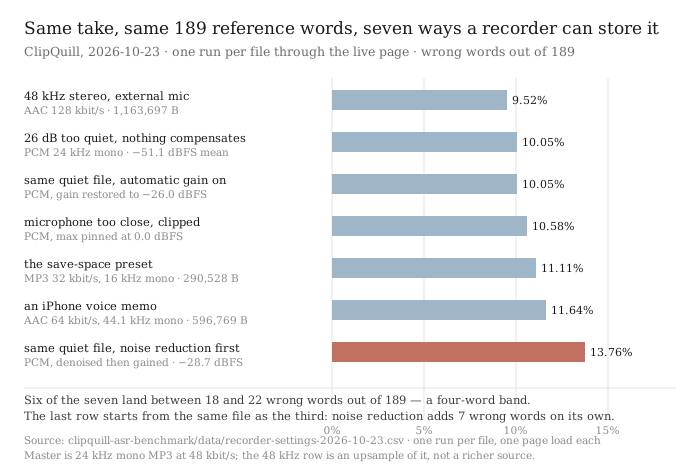
Three phrases sit inside this family — voice recorder to text, iphone voice memo to text and local speech to text. They return 59 result slots on 2026-10-23, 59 distinct URLs across 42 hosts, and the pages are a walkthrough: open Voice Memos, tap the transcript icon, or drop the file on a service. Eight of the 23 pages we could read name the .m4a file and two of those say it is AAC.
None of the 23 says what else is in that file, or what the recorder did to the sound before writing it. Bit rate, sample rate and channel count appear zero times as a description of a recording across the 23. Automatic gain, normalisation, clipping and microphone distance appear zero times as well. Those are exactly the settings a recorder exposes — so we stored one take seven ways and measured each.
What the 23 pages do and do not say
- Three searches, 59 result slots, 59 distinct URLs, 42 hosts. Search taken 2026-10-23 via Brave, top ten per phrase. The family is fragmented rather than owned: across the 30 top-ten slots reddit holds four, apps.apple.com three, and no other host holds more than two of them. There is no vendor manual here, unlike the meeting families on this site.
- 23 of the 25 fetched pages read. Four reddit threads returned HTTP 403 at three user-agent layers, Quillbot returned 403 at the same three, one YouTube watch page returned a 228-character script shell and one Microsoft Store listing 97 characters. Those are counted as not read, and every denominator below is 23.
- The file format is named, the file's contents are not. 8 of 23 mention .m4a, and 2 of 23 say it is AAC. 0 of 23 gives a bit rate or kbit/s. 1 of 23 mentions a sample rate at all — a GitHub README for a speech library that asks you to feed it 16-bit mono PCM at 16 kHz. 2 of 23 print a kHz value, both in text-to-speech documentation for output audio, not for a recording.
- The recorder's own processing is absent. Across the 23: 0 occurrences of automatic gain or AGC, 0 of normalisation, 0 of clipping, 0 of preprocessing, 0 of dynamic range, and 0 of a microphone distance. 3 of 23 mention noise reduction, and all three treat it as a product feature: an Amazon listing for a recorder with “Noise Reduction DSP 6.0”, an App Store page promising “our noise reduction feature significantly enhances audio quality”, and a text-to-speech server's denoise flag.
- Nothing measures the input. 0 of 23 contains ground truth, 0 contains sample size, and the four apparent hits for test set and corpus are all substring collisions inside incorporating, corporate and star — read them in context and there are none. 5 of 23 print an accuracy percentage for a transcription product — Speechnotes' “95% accuracy for good quality dictation or recording”, Transkriptor's 99%, Voicetonotes' 99% / 98.6% / 95%, Plaud's “~98%+” and one user quote on AudioPen — and none of the five gives the number of words it was computed over.
- The size numbers are storage, not signal. 8 of 23 print a MB or GB figure. Six of those are recorder capacities (8GB, 16GB, 64GB, 128GB), app download sizes, or model weights; two are upload ceilings on a transcriber (100MB at AudioPen, 100MB at Audioscribe, whose free tier also caps at 5 minutes). No page relates a file size to a recording length at a given sample rate, which is the one piece of arithmetic that tells you whether a two-hour memo will fit.
Counts are over the pages we could actually read on one day. Where a page returned 403 or a script shell we say so and leave it out rather than guess. Substring hits were checked in context before being called zero.
Seven ways to store the same 72.5 seconds
| the setting | what the file is | size | level | wrong words |
|---|---|---|---|---|
| 48 kHz stereo, external mic | AAC 128 kbit/s | 1,163,697 B | −28.1 dB | 18 / 189 — 9.52% |
| 26 dB too quiet, nothing compensates | PCM 24 kHz mono | 3,480,078 B | −51.1 dB | 19 / 189 — 10.05% |
| same quiet file, automatic gain on | PCM, gain restored | 3,480,078 B | −26.0 dB | 19 / 189 — 10.05% |
| microphone too close, clipped | PCM, max pinned at 0.0 dBFS | 3,480,078 B | −13.6 dB | 20 / 189 — 10.58% |
| the save-space preset | MP3 32 kbit/s, 16 kHz mono | 290,528 B | −25.5 dB | 21 / 189 — 11.11% |
| an iPhone voice memo | AAC 64 kbit/s, 44.1 kHz mono | 596,769 B | −25.2 dB | 22 / 189 — 11.64% |
| same quiet file, noise reduction first | PCM, denoised then gained | 3,480,078 B | −28.7 dB | 26 / 189 — 13.76% |
Read the first six rows and the conclusion is uncomfortable for everyone selling conversion: the save-space preset is not the worst file. At 290,528 bytes — 12.0 times smaller than the uncompressed master — the 16 kHz 32 kbit/s MP3 scored 21 wrong words. The iPhone-shaped file at 596,769 bytes, twice the bit rate and nearly three times the sample rate, scored 22. The 48 kHz stereo file at 1,163,697 bytes, four times the size of the preset, scored 18. Everything between 18 and 22 is four words wide, and four words is what this recogniser moves on its own when nothing changes at all — 2026-10-18 recorded a ±1-word swing on identical audio, and the two quiet rows here differ from the master by nothing but level.
So the honest reading of the top six is not “bigger files are better”. It is that the container and the bit rate were never the variable that mattered for this material, and the two things a recorder does that people worry about — being quiet, and being loud enough to clip — cost one word each at most. A 26 dB drop in level, which is a factor of 398 in power, did not change the error count at all.
The one setting that did move it: noise reduction
The last row and the third row start from the same 26 dB-down source file. One gets the recorder's automatic gain. The other gets noise reduction, then the same gain. Everything else — the take, the reference text, the page, the model — is identical.
The gained file scored 19 wrong words. The denoised file scored 26. Seven words out of 189 is +36.8% on the error rate, and it is the only row in the table that leaves the four-word band. The transcript shows where they went: the quick brown fox came back as “the quick round fox”, as national as a jingo poem as “a gingerbread poem”, Mr. Carker used to flash his teeth as “Mr. Carcure Used to flash his teeth”, and like a shampooer in a Turkish bath as “what a shampoo in my Turkish bath”. These are not dropped words; they are words that were heard and heard wrong.
The obvious objection is level: the denoised file ended up 2.7 dB quieter than the gained one (−28.7 against −26.0 dBFS mean), so maybe the loss is just quieter audio. That explanation does not survive the row above it. The plain quiet file is 25 dB quieter still — −51.1 dBFS — and scored 19, the same as the gained copy. A file 25 dB below the denoised one scored seven words better. In this measurement the noise reduction filter, not the level, is what changed the answer.
One filter, one setting: afftdn with a −40 dB noise floor, which is a spectral subtraction, applied to a recording whose noise floor is real room tone. A different denoiser, a different floor or a different material could land elsewhere. What this row establishes is that the switch is not free — not that every implementation of it behaves like this one.
What the pages say about the audio, in their own words
- “iPhone Voice Memos are saved as M4A audio, and we transcribe M4A files directly — there's no need to convert them to MP3 first.” — Audioscribe's FAQ, one of two pages in the 23 that names the codec behind the extension. It stops at the container; no bit rate, no sample rate, no channel count.
- “Voice Memos records M4A (AAC), and most Android recorders produce M4A or MP3.” — Spokenly, the second of the two. The sentence is as far as any page in this set gets towards describing the file itself.
- “Our noise reduction feature significantly enhances audio quality by reducing background noise, ensuring your recordings are crystal clear.” — an App Store listing for a recorder with transcription, one of the three pages in the 23 that mention noise reduction. No number, and no mention of what it does to a recogniser.
- “Accuracy in English is very good and can easily reach 95% accuracy for good quality dictation or recording.” — Speechnotes, which is the only page in the set that puts a condition on its own number. “Good quality” is doing a lot of work in that sentence, and the page never defines it.
- “If it's an hour long, transcribing it yourself will take you about 6! hours of work.” — Speechnotes again, on the cost of the alternative. It is the only page in the 23 that reasons about duration at all.
Five quotes, and no number attached to any of them that describes the recording. The rest of the result set is a route: open Voice Memos, find the transcript icon, share the .m4a to a service, wait. Those routes are accurate and we are not arguing with them. They answer which button, and the question a recorder owner actually has is which setting.
Quotes are the pages' own short phrases, taken from the plain-text extraction of each page on 2026-10-23. Emphasis added.
Three phrases, and one of them is not the same job
voice recorder to text and iphone voice memo to text return overlapping sets — the same guides, the same app roundups, with Apple's own support page and a handful of iOS how-tos replacing the generic ones. Both are about a file that already exists.
local speech to text does not hold still. Of its ten results on 2026-10-23, four are about text-to-speech: BentoML's open-source TTS model roundup, LocalAI's text-to-audio documentation, Modal's list of TTS models, and a Microsoft Store listing for a local voice studio. Five are speech-to-text, and one asks for both in the same thread. Anyone searching that phrase is as likely to want a computer to talk as to listen, and the pages do not distinguish.
For the part of that phrase that does mean listening: local is a property of where the recogniser runs, not of the recorder. Our page runs the model inside your browser tab — the .m4a is read from disk and never uploaded — so each setting measured above applies whether the file came off an iPhone, a 30-dollar recorder or a laptop. What the recorder decided before it wrote the file is the part you cannot undo afterwards, and on this evidence the two decisions that matter are whether it clipped and whether its noise reduction was on.
What these numbers do not cover
- One reader, one room, one language. The 72.455 seconds are six existing clips from a public read-speech set, spliced and padded to a fixed length. One English speaker, no accent variety, no second person. Each number here is about what was done to the file, not about who was speaking.
- The source was already 24 kHz mono MP3 at 48 kbit/s. That is the master. The 48 kHz stereo row is an upsample and the 16 kHz row a downsample of it; neither recovers anything the master did not have. This is why the two hi-res and preset rows sit inside four words of each other, and it is a limit of the experiment, not a finding about sample rates in general.
- We built the recorder's processing ourselves with ffmpeg. Automatic gain is dynaudnorm, noise reduction is afftdn, clipping is a +12 dB gain into a 16-bit ceiling. No audio came out of an actual recorder, a phone, or any product named on this page. These are one implementation each of three switches that many devices have.
- The clipped row is genuinely clipped. max_volume is pinned at 0.0 dBFS, so samples are flattened, not limited. It still cost only one more wrong word than the master. If you expected clipping to be catastrophic, the measurement disagrees, and we are printing the disagreement.
- One run per file. Each file was transcribed once, one page load each, in the order shown. The first run carries the 63 MiB model download (193.9 s wall for a 72.5 s file); the rest are warm and ran between 50.4 and 142.1 seconds. Timing is a single observation per row and is not the point of this page.
- Four words is the jitter band. Six of the seven rows fall between 18 and 22 wrong words. We treat differences inside that band as noise rather than as effects, which is why the only claim this page makes about a setting is the noise reduction row — the one that lands seven words outside it.
- We did not run any of the 23 pages. Nothing was uploaded to Audioscribe, Spokenly, Transkriptor, Plaud, Speechnotes, Voicetonotes or anyone else, and no figure on this page is a measurement of their products.
Try it on your own recording
The transcriber is on the front page of this site. It reads the file in your browser tab, so the .m4a never leaves your machine — and the ceiling is 30 minutes of audio and 512 MiB per job, which makes a two-hour memo four jobs. Expect the first run to spend about 63 MiB on the model plus a 21.5 MiB runtime, and after that, measured today on this device, 50.4 to 142.1 seconds per 72.5 seconds of audio — the spread is the file, not the voices, and the two fastest runs were the two that had been denoised or gained. What you get back is timestamped text that wraps at 42 display-width units a line, exported as TXT, SRT or VTT — and no speaker labels, because we do not do speaker separation. Whatever your recorder already did to the audio is fixed by the time you get here; this page has just measured which of those decisions you can stop worrying about.