Questions people actually ask about this phrase
Does Teams transcription say who is speaking?
Microsoft's own support page says a live transcript "includes each speaker's name and time stamp", and one result gives a number for when that stops being true: TicNote's guide says speaker accuracy degrades in large meetings and that with 10+ participants talking over each other Teams often misattributes lines or leaves long segments unlabelled. None of the 38 readable pages gives a figure for how often the label is right, and none of the 38 mentions a dial-in participant's voice at all in that context. Our engine does not do speaker separation: across 36 subtitle cues produced from 8 clips on 2026-10-19, 0 of 36 carried a speaker label. When we put two streams into one file on this page the names were never the problem — the words were.
What does Teams actually save — one audio file or one per participant?
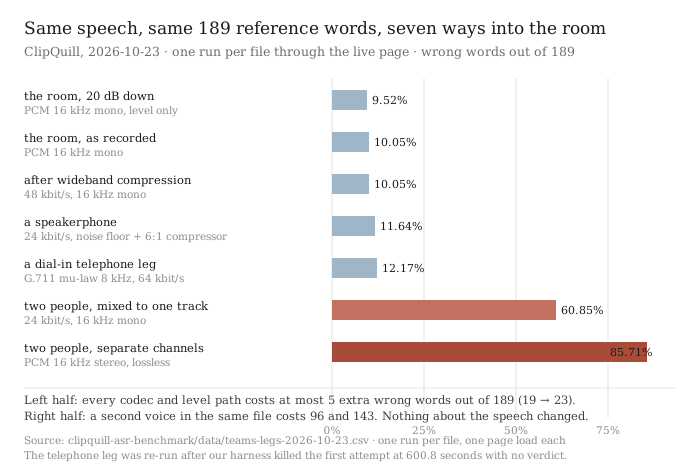
The pages will tell you the transcript is stored in the organiser's OneDrive for Business or the team's SharePoint site, and that you can download it as .docx or .vtt. Not one of the 38 says what the audio looks like inside that process, whether every participant arrives as a separate track or as one mixed stream, or what happens to whoever dialled in. We could not settle it from the pages, so we simulated the two possibilities that matter and measured both. On separate channels: 85.71% wrong. Mixed into one mono track: 60.85% wrong. Against 10.05% for the same speech alone in a quiet room.
Does transcription still work if someone dials in by phone?
Microsoft Support states the limit on the viewer side plainly: "People who call into a meeting can't view the transcript." One third-party guide repeats it as a table row. What no page in this result set says is whether a dialled-in voice still appears in the text at all, or what it costs when it does. We built the leg: the same sentence over G.711 mu-law at 8 kHz, 64 kbit/s, which is what a telephone leg carries. It cost 4 more wrong words out of 189 - 12.17% against 10.05%. A phone caller's audio is not a catastrophe for the recogniser. It is one of the smaller penalties measured here, and it is the only leg in this family that arrives through a codec nobody on the call chose.
Is Teams transcription accurate?
Four of the 38 readable pages print a percentage and none of the four says how many words it was computed over: Notta prints 98.86% three times across its pages, Tactiq prints 100% for speaker identification in a testimonial, and the rest of the percentages on those 38 pages are testimonial fragments rather than an error rate on a corpus. On our own material the honest answer is a range, because the same 189 words produced seven different numbers depending on how the audio arrived: 9.52% to 85.71%. A percentage without the condition it was measured under is not a smaller version of the truth, it is a different claim.
Can I transcribe a Teams recording that was made without recording switched on?
This is the phrase the whole family circles. Transcription and recording are separate switches in Teams, and Microsoft's page says the transcription starts automatically when you record — so the one thing all four of those pages agree on is that the two are tangled. TicNote's guide warns that in some organisations transcription is tied to recording and you may have to start recording first; one Microsoft Q&A thread is titled around transcription not working without recording. Once a file exists, the client that wrote it stops mattering: any local recording is just a file, and this page will read it. Our ceiling is 30 minutes of audio and 512 MiB per job, so a 45-minute meeting is two jobs.
What is different about a Teams meeting versus a phone call transcript?
The members. A one-to-one call has one voice per direction and nothing to confuse; a meeting has four or six people whose streams have to be carried, mixed and possibly labelled. The measurement on this page is the cost of that mixing: two streams that never share a second, kept on separate channels, came back at 85.71% wrong; the same two streams summed into one mono track came back at 60.85% wrong. Both are far from the 10.05% the material scores alone, and the direction may surprise you - the lossy mixed copy scored better than the lossless separated one, because the recogniser sums the channels anyway and the stereo file gave it two copies of the same thing at full level.
Do you do live Teams transcription?
No. Not one word on this page is a live caption. Our tool reads a file that already exists on your disk, and it does the reading in your browser tab, so nothing is uploaded. If words have to appear on screen while people are still talking, that is Teams' own caption and transcription feature, and the answer is in the manage-meeting-transcription-captions article that appears twice in this result set. The honest split is: they do live, we do the file afterwards, and the two do not overlap.
The same 72.5 seconds, seven ways into the meeting
Ten phrases sit inside this family — teams transcription, microsoft teams transcription, microsoft teams transcript, teams meeting transcription, team meeting transcript, transcribe teams meeting, ms teams transcription, teams meeting transcription without recording, record and transcribe teams meeting and teams live transcription. We searched all ten and read what we could. They answer one question very well: where is the switch, and who is allowed to press it. Licence, meeting policy, organiser versus presenter, where the file lands. What none of the 38 answers is what the thing they switched on is actually reading.
That question is not rhetorical. A Teams meeting is not one voice into one microphone. It is four or six microphones, a telephone bridge, a speakerphone in a conference room and a laptop fan, all of them compressed by their own clients before anything is mixed. Whether that matters is measurable — and nobody on the first screen has measured it.
What came back, and from where
- Ten searches, 100 result slots, 49 distinct URLs, 26 hosts. Search taken 2026-10-21 via Brave, top ten per phrase. The overlap is extreme: Microsoft Learn supplies ten of the 49 URLs and Microsoft Support four, and both appear in all ten phrase families. utk.teamdynamix.com contributes three, notta.ai three, reddit four.
- 38 of the 49 pages read. Four reddit threads returned HTTP 403 at three user-agent layers plus a shell request. Three university help-desk pages returned 403 at the same three layers, and one refused the connection outright at 22 seconds. Two YouTube watch pages returned a 159-character script shell with no article on them. Those eleven are counted as not read, and every denominator below is 38.
- Fourteen of the 49 URLs belong to Microsoft, and they are the best pages in this result set. For the head phrase, five of the ten results are Microsoft. This is the one meeting family where the vendor has already written the manual — and the manual is complete about licences and silent about signals.
- The technical vocabulary is absent. Across the 38 pages: 0 occurrences of sample rate, 0 of kHz, 0 of kbit/s or bitrate, 0 of codec, 0 of narrowband or wideband, 0 of Opus, G.711 or G.722, 0 of resampling.
- Five pages agree that the failings are the participant's fault, and none shows the number. TicNote's guide says speaker accuracy “degrades in large meetings” and that with “10+ participants talking over each other, Teams often misattributes lines or leaves long segments unlabeled” — the only page in the 38 to name a participant count. Jamy's guide says accuracy drops when “multiple people speak at once”. Read AI says the transcript of a 60-minute meeting is “8,000 words of back-and-forth”. None of those five attaches a wrong-word count to any of it.
- Four of the 38 print a percentage — Notta's 98.86% on three of its pages, Tactiq's 100% speaker identification inside a testimonial. Zero of the four gives the number of words it was computed over. The phrases test set, corpus, ground truth, validation set and sample size appear 0 times across all 38.
- Three of the 38 mention a dial-in participant at all — two Microsoft pages and one guide repeating them — and all three say the same thing about the screen, not about the voice: “People who call into a meeting can't view the transcript.”
Result kind is a reading of ten search pages on one day. Counts are over pages we could actually read; where a page returned 403 or a script shell we say so and leave it out rather than guess.
Seven ways the same participant can arrive
| how they arrived | what the file is | size | wrong words |
|---|---|---|---|
| the room, 20 dB down | PCM 16 kHz mono, level only | 2,320,046 B | 18 / 189 — 9.52% |
| the room, as recorded | PCM 16 kHz mono | 2,320,046 B | 19 / 189 — 10.05% |
| after wideband compression | 48 kbit/s, 16 kHz mono | 435,716 B | 19 / 189 — 10.05% |
| a speakerphone | 24 kbit/s, noise floor + 6:1 compressor | 217,952 B | 22 / 189 — 11.64% |
| a dial-in telephone leg | G.711 mu-law 8 kHz, 64 kbit/s | 580,940 B | 23 / 189 — 12.17% |
| two people, mixed into one track | 24 kbit/s, 16 kHz mono | 222,488 B | 115 / 189 — 60.85% |
| two people, kept on separate channels | PCM 16 kHz stereo | 4,736,014 B | 162 / 189 — 85.71% |
Read the last five columns in order and the story is not the one the SERP tells. Every codec penalty in the top half is small. Going from 2,320,046 bytes of PCM to 217,952 bytes of compressed speakerphone audio - a 10.64-fold reduction in bytes - moved the error count from 19 to 22. Taking the same voice through a G.711 telephone leg at 8 kHz, which is a quarter of the bandwidth the recogniser would have had, added 4 wrong words out of 189. Twenty decibels of level change — about a hundredth of the acoustic power — actually came back one word better than the unattenuated copy.
Then look at the bottom two rows. The moment a second person is in the same file, the number is not in the same league: 60.85% mixed, 85.71% separated. That is six to eight and a half times the error rate of the same voice alone, and the cause is not compression, level, bandwidth or noise — all four of those were held constant or made harsher. The cause is that two voices are now being asked to share one recognition pass.
The counter-intuitive one: the lossless separated file scored worse than the lossy mix
The separated copy is 4,736,014 bytes of 16 kHz stereo PCM, the mix is 222,488 bytes of 24 kbit/s mono MP3 — 21.3 times smaller. The mix also has the same two voices in it. It scored 115 errors against 162, and it finished in 43.8 seconds against 63.8.
The explanation is not mysterious once you know where the summing happens. The page does not hand a stereo file to the recogniser as two channels; it sums them, and the second stream in our stereo file was the same material delayed and only 6 dB down, so the sum is two overlapping copies of one voice at full level. The mixed file had already been through that sum, once, at 24 kbit/s where the quieter of two near-identical copies mostly disappears into the codec. Neither number is a product claim about any meeting platform. What they establish is narrower and more useful: once there are two voices in one recognition pass, which file you keep — and what you do to it — changes the answer by a factor of nearly one and a half.
And the one thing that did not happen is worth writing down. No page in the 38 says what the platform saves — one stream per participant, or one mixed track. That question decides whether a meeting transcription lands closer to 10% or closer to 60%, and it is not answered anywhere on the first screen.
What the pages do say about the audio, in their own words
- “Speaker accuracy degrades in large meetings. With 10+ participants talking over each other, Teams often misattributes lines or leaves long segments unlabeled.” — TicNote's guide, the only page in the 38 to put a number on the number of people. No wrong-word count follows.
- “Live transcription accuracy can drop when: Multiple people speak at once · Background noise is present · Speakers have strong accents or different dialects.” — Jamy's guide, one of two pages that lists the failure conditions, and the only one that also tells you to avoid talking over each other.
- “For best speaker labels, ask people to pause for a beat when switching speakers. That small gap helps Teams match names to the right lines.” — TicNote again, which is the closest any page in this result set gets to describing the mechanism, and still calls it a habit rather than a limit.
- “People who call into a meeting can't view the transcript.” — Microsoft Support, in a permissions table. It is the only sentence in 38 pages that concerns a dial-in participant at all, and it is about what they can see, not what their voice does to the text.
Four quotes, and no number attached to any of the four. The rest of the SERP is a walkthrough: open More actions, choose Record and transcribe, confirm the spoken language, find the file in chat or Recap. It is a good walkthrough — Microsoft's own article is longer and more accurate than the vendors' versions of it — and it answers a question about buttons, not about sound.
Quotes are the pages' own short phrases, taken from the plain-text extraction of each page on 2026-10-21. Emphasis added.
Ten words, and three of them are not the same job
The family splits once you read the results rather than the keywords. teams transcription, ms teams transcription and microsoft teams transcription return almost the same ten pages. teams meeting transcript and team meeting transcript tilt towards university help desks — five different institutions in the top ten for the second one. And teams meeting transcription without recording — the lowest-volume phrase of the ten — is the only one that returns a genuinely different set of pages, because it is the only one where the answer might be no.
That phrase is worth spelling out, because the pages disagree in a way that matters. Microsoft's own support article says the transcription starts automatically when you record, which makes the two features look inseparable. TicNote's guide says in some organisations transcription is tied to recording and you may have to start recording first to unlock it. Jamy's guide goes further and claims the transcript only survives when recording is on. Topedia's blog documents a 2026 change letting organisers pick Transcribe only as a standalone option when scheduling. All four are describing a real product change, and all four leave the same thing out: none of the four says what happens to the audio of a person who joined by telephone, which is the one participant whose voice has already been through a codec nobody chose.
On the live half of this family: we do not offer real-time transcription, and this page will not pretend to. Five of the ten results for teams live transcription are the same Microsoft and university pages that answer the other nine phrases. Our tool reads a file that already exists on your disk, in your browser tab, and it is the opposite of live. If words need to appear while people are still talking, that is Teams' own caption feature.
What our numbers do not cover
- Seven files, but only two voices. All six source clips are one pair of English speakers from a public read-speech corpus. The second stream in the two-voice rows is the same material delayed 1.5 seconds at −6 dB, not a second person — so those two rows measure what an overlapping second stream costs, not what two different people talking costs.
- We built the chains ourselves with ffmpeg. No audio came out of a real Teams meeting. G.711 at 8 kHz is the telephone leg as a codec, not any carrier's implementation of it; the wideband file is 48 kbit/s, not Opus at 32 kbit/s, and the page's decoder handled both, so the codec choice was not the variable — the path was.
- The speakerphone row is a filter, not a phone. A pink-noise floor at amplitude 0.02 and a 6:1 compressor above −30 dB, chosen to be audible. It is one point on a curve, not a model of a handset.
- Level moved the answer in the wrong direction. The 20 dB-down copy scored 18 errors against 19 for the full-level one. On 189 words that is a single word, which is inside the noise of this recogniser (2026-10-18 recorded the same ±1 word jitter with no change at all to the audio), and we print it rather than smooth it away.
- One run per file. Each file was transcribed once, one page load each. The 310.6-second first run carries the 63 MiB model download; the rest are warm. Timing numbers here are single observations and are not the point of this page.
- The telephone-leg row needed a second run. The first attempt was killed by our own harness at 600.8 seconds with no verdict, and that run reported the page as cross-origin isolated. The re-run finished in 81.8 seconds and reported no cross-origin isolation, so that row was measured under a different runtime configuration from the other six. The file, the chain and the reference text were identical; we are flagging it because it is the one row in the table whose environment is not the same as its neighbours.
- We did not run any of the 38 pages. Nothing was uploaded to Teams, Notta, Tactiq, Read AI, TicNote, HiNoter or anyone else, and no accuracy figure on this page is a measurement of their products.
Try it on your own recording
The transcriber is on the front page of this site. It reads the file in your browser tab, so the audio never leaves your machine — and the ceiling is 30 minutes of audio and 512 MiB per job, which makes a 45-minute meeting two jobs. Expect the first run to spend about 78.4 MiB on the model download and roughly a gigabyte of RAM; after that, on this device and measured today, 43.8 to 174.8 seconds per 72.5 seconds of audio — between 0.6 and 2.4 times real time, and the spread is mostly the file, not the voices. What you get back is timestamped text that wraps at 42 display-width units a line, exported as TXT, SRT or VTT — and no speaker labels, because we do not do speaker separation. A local recording from any client is just a file; this page will read it, and what the client did to it along the way is the part this page has just measured.