Questions people actually ask about this phrase
Does Zoom transcription say who is speaking?
Zoom's own pages describe speaker labels as a feature of its AI Companion summary experience rather than of the plain transcript, and none of the nine readable pages in this result set gives a number for how often the label is right. Our engine does not do speaker separation at all: across 36 subtitle cues produced from 8 clips on 2026-10-19, 0 of 36 carried a speaker label. If you need to know which of six people said a sentence, this is the wrong tool and so is every page on the first screen that promises it without a figure.
How long does Zoom take to transcribe a recording?
The pages in this result set disagree by more than an order of magnitude. Otter's guide says transcript processing "often takes longer than the meeting itself" and that Zoom notes up to 24 hours at peak demand; Read AI says a 30-minute meeting produces a transcript in roughly an hour; Grain says Zoom typically takes twice the meeting's duration. None of the three says which plan, which region or which recording size that was measured on. Our own engine, warm and on this device, processed 34.739 seconds of audio in 19.3 to 23.2 seconds across six runs on 2026-10-20 - 33.3 to 40.1 seconds of processing per minute of audio - and the first run of a session also pays for the model download, which cost 59.9 seconds in total for that same file.
Is Zoom transcription accurate?
Four of the nine readable pages print a percentage and they do not agree. Zoom's own 2026 guide prints word error rate figures of 7.40% for Zoom AI transcription, 7-15% for leading tools and 2-4% for human transcription under optimal conditions. Otter's guide cites a University of Colorado OIT study putting Zoom's native transcription at 48% to 85% accuracy. Notion, in the same result set, prints 98.86% for itself. Not one of the four says how many words the number was computed over. That is the part that matters: 7.40% on 92 reference words is 6.8 wrong words, and on a 15-second clip at 37 words it is 2.7 wrong words - a difference you cannot see in a percentage.
What does the meeting platform do to the audio before transcription?
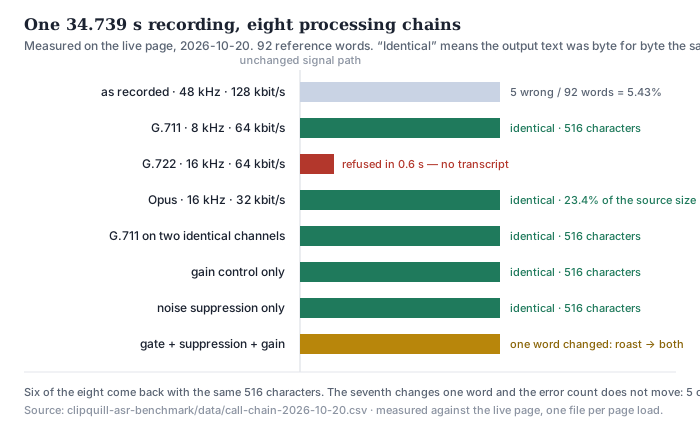
It applies a chain, and the chain is invisible in the transcript. In our test the same 34.739 seconds of speech, written as G.711 mu-law at 8 kHz, as Opus at 32 kbit/s, carried on two identical channels, and passed through automatic gain control or through noise suppression alone, produced six transcripts that were identical byte for byte to the untouched file. Only when gate, noise suppression and gain control were stacked together did one word change. G.722 at 16 kHz was refused by the browser before any recognition happened.
Can I transcribe a local Zoom recording, without cloud recording?
Yes, and this is the gap the first page does not fill. Otter's guide states it plainly: built-in Zoom transcription "requires a paid plan, cloud recording, and the audio transcript setting enabled", and "local recordings won't generate a transcript". Several other pages repeat the same three gates. A local recording is still a normal video or audio file on your disk, and any transcriber that reads files - including this one, in the browser tab - will read it. We have not tested a Zoom-produced local file ourselves; our 8-clip corpus is not from a meeting client.
Does transcription work on the live meeting, or only on a recording?
On this site, only on a recording. Zoom has a live layer of its own, and four of the ten results in this result set are pages about switching live transcription or live captions on and off per account or per university. We do not offer that: the file has to exist on your disk before the page can read it, and we do not promise any real-time captioning. If you need words on screen while people are still talking, use the platform's own caption feature.
What audio formats can I hand it?
MP4, MOV, WEBM, M4A, MP3, WAV, AAC, OGG, FLAC, OPUS, 3GP and M4B. It is not every codec that can be inside those containers. In our 2026-10-11 end-to-end run of 9 files, six were MP4 and five of those were accepted; the one that was refused carried AC-3 audio. In the run on this page, a WAV container holding G.722 ADPCM was refused in 0.6 seconds with the message "Could not decode this file. The browser could not read its audio track." A meeting client that hands you G.722 will hand you a file this page cannot open, and that is a decoder limit, not a recognition result.
What the first page actually answers, and what it never mentions
Seven phrases sit inside this family — zoom transcription, transcribe zoom, zoom transcript, zoom meeting transcription, zoom ai transcription, zoom recording transcript and zoom live transcription. We searched all seven and read the pages. They answer one question well: how do I turn it on. Plan tier, where the setting lives, which admin owns it, whether the file arrives by email. What none of them answers is what the thing they switched on is reading.
That is a strange gap for a page about a product that runs on the public internet through a codec chosen for bandwidth. A meeting client does not hand a recogniser the studio master. It hands it whatever survived the codec, the gain control and the suppression that keep a call usable on a hotel wi-fi. Whether that matters is a measurable question, and nobody in the top ten has measured it.
What came back, and from where
- Seven searches, 35 distinct URLs, 20 registrable domains. Search taken 2026-10-20 via Brave, top ten per phrase. support.zoom.com contributes six of the 35 URLs, www.zoom.com four, and both appear in every phrase family.
- 18 of the 35 pages read. Three reddit threads returned HTTP 403 at both user-agent layers. Four university IT pages timed out at 45 and 60 seconds across three attempts and are counted as not read.
- Five of the ten results for the head phrase are Zoom's own — three support articles, an app-marketplace listing and the AI Assistant feature page. Every count below is over the 18 pages we could read, not the 35 URLs.
- The technical vocabulary is absent. Across those 18 pages: 0 occurrences of sample rate, 0 of kHz, 0 of kbit/s or bitrate, 0 of codec, 0 of narrowband or wideband, 0 of Opus, G.711 or G.722, 0 of resampling.
- Two pages name the subject and stop. Grain's guide lists the four things accuracy depends on — “input audio quality, compression, sampling rate, reverberation” — and attaches no number to any of them. ScreenApp's guide says accuracy “depends on the audio each participant sends” and then moves on.
- Four of the 18 print an accuracy percentage. Zoom prints 7.40% word error rate, Otter 48%–85%, Notion 98.86%, Krisp up to 96%. Zero of the four gives the number of words it was computed over.
Result kind is a reading of seven search pages on one day. Counts are over pages we could actually read; where a page returned 403 or timed out we say so and leave it out rather than guess.
Eight ways to write the same 34.739 seconds
| what the platform did | sample rate | codec | file size | transcript |
|---|---|---|---|---|
| nothing — as recorded | 48 kHz | MP3 128 kbit/s | 556,844 B | 5 errors / 92 words |
| G.711 mu-law, the narrowband leg | 8 kHz | 64 kbit/s | 278,004 B | identical, byte for byte |
| G.722 wideband ADPCM | 16 kHz | 64 kbit/s | 278,004 B | refused in 0.6 s |
| Opus, one mono channel | 16 kHz | 32 kbit/s | 130,336 B | identical, byte for byte |
| the G.711 audio on two identical channels | 8 kHz | 64 kbit/s stereo | 555,916 B | identical, byte for byte |
| automatic gain control only | 48 kHz | unchanged | 556,844 B | identical, byte for byte |
| noise suppression only | 48 kHz | unchanged | 556,844 B | identical, byte for byte |
| gate + suppression + gain control | 48 kHz | unchanged | 556,844 B | one word changed |
Read the second column first. The narrowband copy is 11.4 dB down above 3.8 kHz against the source — measured with a filter, not inferred from the name — and it is half the byte count. The Opus copy is 23.4% of the source. Both come back with the same 516 characters. So does the copy where the same narrowband audio is carried twice.
Then read the last three rows. Gain control and suppression are the two things a meeting platform is most likely to apply before anyone hears anything, because they are what makes a call listenable. Applied one at a time to audio that already transcribes cleanly, they changed nothing. Applied together with a gate, they changed one word: roast became both. The error count did not move — 5 out of 92 either way — because a wrong word in place of a wrong word is still one wrong word.
What the platform actually puts in the file, in megabytes
| meeting length | at 32 kbit/s | at 64 kbit/s | saved as 128 kbit/s MP3 |
|---|---|---|---|
| 30 minutes | 6.9 MiB | 13.7 MiB | 27.5 MiB |
| 45 minutes | 10.3 MiB | 20.6 MiB | 41.2 MiB |
| 1 hour | 13.7 MiB | 27.5 MiB | 54.9 MiB |
| 2 hours | 27.5 MiB | 54.9 MiB | 109.9 MiB |
| 8 hours | 109.9 MiB | 219.7 MiB | 439.5 MiB |
This is the part that decides whether you can transcribe the thing at all, and it is arithmetic on the bitrates above. Our page has two limits: 30 minutes of audio and 512 MiB. At 64 kbit/s, 512 MiB holds 1,118 minutes — a 40-minute meeting uses 3.6% of the size limit. The clock is the wall, never the bytes. The one row that gets close is the last: a full working day stored as 128 kbit/s MP3 is 439.5 MiB, which is inside the limit but would still have to be cut into separate jobs at the 30-minute mark.
The two things the pages do say about quality, and what they attach to it
- “Accuracy: Determining the accuracy is quite difficult as, ultimately, it depends on input audio quality, compression, sampling rate, reverberation, and more.” — Grain, who then compares itself to Zoom without a number for any of the four.
- “Accuracy depends on the audio each participant sends, so a call with several people talking over each other or on a poor connection has more gaps than a clear one-on-one call.” — ScreenApp, in the middle of a how-to, with no figure attached.
- “Audio quality, background noise, and compression all affect downstream accuracy.” — Zoom's own 2026 guide for IT buyers, in the middle of its pipeline diagram. It is the closest any page in this result set comes to naming the codec, and it names it as a noun without a value.
Three pages, three different first causes — vague input quality, each participant's own upload, and compression — and not one number attached to any of them. That is the whole of what the first ten results say about the audio that arrives at the recogniser. The rest of the SERP is about where the switch is: Otter and Grain and ScreenApp all walk the same path — paid plan, cloud recording on, “create audio transcript” checked — and Otter is the only one blunt enough to add that “local recordings won't generate a transcript”.
Quotes are the pages' own short phrases, taken from the plain-text extraction of each page on 2026-10-20. Emphasis added.
Recording transcription, meeting transcription, and AI transcription are three different products
The family splits cleanly once you read the pages rather than the keywords. Zoom recording transcript returns mostly Zoom's own support articles about where the file lands and how to download it. Zoom meeting transcription returns a mix of those and of third-party tools that want you to hand over a file afterwards. Zoom AI transcription returns almost nothing but vendors selling an AI notetaker that joins the call, because that phrase belongs to the bot, not to the recorder.
Our product sits in the first two and nowhere near the third. It reads a file that already exists — the one the recorder wrote, whether that recorder was Zoom, a phone, or a laptop. It does not join a call, does not sit in a meeting, and does not produce a summary. We say this plainly because the first page does not: several of the ten results are bots, and the word “bot” is doing a lot of unspoken work in the comparison tables.
On the live half of this family: four of the ten results for zoom live transcription are university pages about switching live captions on for a class, and two are Zoom's own articles about Zoom Phone call transcription. We do not offer any real-time transcription. The file has to be on your disk before this page can read it, which is the opposite of live. If words need to appear while people are still talking, that is the platform's caption feature and not this page.
What our numbers do not cover
- One recording is not a meeting. The source is 34.739 seconds — four reference clips joined with 0.4 seconds of silence — one speaker, one channel, English only. It proves what a codec does to a clean signal; it does not prove what a codec does to six people on six laptops.
- We pushed our own audio through the codecs. We did not take audio out of Zoom. The eight chains reproduce the settings a client can apply, not any vendor's implementation of them.
- The last three chains are ffmpeg filters I set by hand — gate, spectral suppression, automatic gain — chosen to be audible, not to match a particular product. Two of them together changed one word; that is a data point, not a law.
- G.722 being refused is a decoder limit. The page's own message is “Could not decode this file. The browser could not read its audio track.” It says nothing about whether G.722 audio would transcribe well if it could be decoded.
- 5.43% sits on a boundary of our own error counting. Splitting riverbank into river bank and reading Mister as Mr each count as one error here. The interesting column is not the absolute number but the fact that it does not move between chains.
- No audio was ever mixed across participants. A real meeting arrives as separate streams; this test has one stream from beginning to end.
- We did not run any of the ten results. Nothing was uploaded to Zoom, Otter, Notion, Krisp, Grain, ScreenApp or anyone else, and no accuracy figure printed on this page is a measurement of their products.
Try it on your own recording
The transcriber is on the front page of this site. It reads the file in your browser tab, so the audio never leaves your machine — and the ceiling is 30 minutes of audio and 512 MiB per job, which makes a 45-minute meeting two jobs. Expect the first run to spend about 78.4 MiB on the model download and roughly a gigabyte of RAM; after that, on this device and measured today, 33.3 to 40.1 seconds of processing per minute of audio. What you get back is timestamped text that wraps at 42 display-width units a line, exported as TXT, SRT or VTT — and no speaker labels, because we do not do speaker separation. A local recording from any client is just a file; this page will read it, and what the client's codec did to it along the way is the part this page has just measured.