◆MKV to SRT: two jobs wear the same four words
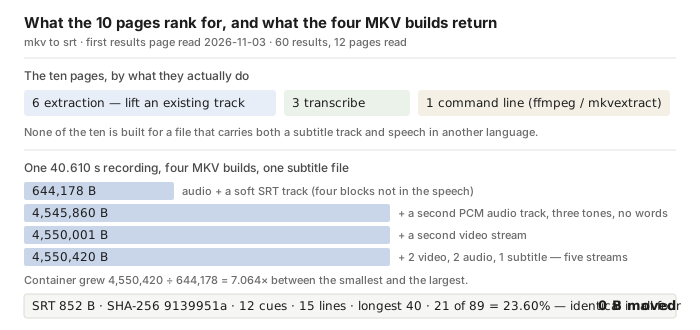
◆◆MKV to SRT is two different jobs. One is extraction: copy a subtitle track that is already inside the Matroska file out into an .srt, with the timings it was authored with. The other is transcription: listen to the audio inside the MKV and write subtitle cues from the speech, timings estimated. Extraction loses nothing and takes a second. Transcription is the only option when the file has no text track. On ◇2026-11-03 the first page of results for mkv to srt held six pages doing extraction, three doing transcription and one printing ffmpeg switches — nothing else.
◆◆Test the file before you pick either. A track inside an MKV has a text codec name — subrip, ass, webvtt — and it survives every remux; a burned-in caption has no track at all, it is paint on the picture, and the only route out of it is OCR. If the file lists a text subtitle track, extract it: you get the authored timings, and no recogniser can beat that. If the only track is PGS (image subtitles), extraction gives you .sup images, not text, and OCR is the real job. If there is no subtitle track, then the audio is the only source, and the only question left is which of the audio tracks inside the container the tool actually listens to.
◆◆Our tool only does the second job, and the audio stream decides the answer. We built the same 40.6-second recording into MKV files that differ only in what rides along in the container — an appended subtitle track, a second audio track, a second video stream, all of them at once — and the recogniser produced the same 852-byte SRT, SHA-256 9139951a for every one of them. It never read the track, never saw the second video and never touched the second audio. What it reads is the first audio stream, and on this container that is also the stream marked default.
◆◆So if your MKV carries a dub, you are one of the six-against-three. Extraction hands you the subtitle somebody wrote for that language. Transcription hands you a transcript of whichever audio stream comes first — and if that is the dub, you get the dub. Which is right depends on what you wanted, and that is exactly the sentence none of the ten printed.
Search result pages read 2026-11-03, one page of results per phrase, three phrases. Nothing here is a traffic estimate, and the volumes for this set were not supplied to us, so none are printed.
Questions this page gets asked
Does MKV to SRT mean extract or transcribe?
◇On one page of results on 2026-11-03, 6 of 10 meant extract and 3 of 10 meant transcribe. If the MKV already carries a text subtitle track (subrip, ass, webvtt), extract it — the authored timings are better than any recogniser. If it carries no subtitle track, transcribe. If the only subtitle track is PGS, extract gives you image files and the text half of the job is OCR.
Which audio track does the tool listen to when the MKV has two?
◆The first one. We appended a second PCM track over the speech — three tones, no words — and the output was the same 852-byte SRT (SHA-256 9139951a), in cue text and in cue timing, as the single-audio build. Nothing from the second track appeared, which is what a reader wants from a tool that never asks which track you meant. It is also why, on a file with a dub in front of the original, the transcript comes back in the dub.
Does an .srt file inside the MKV get used?
◆No. We muxed in an srt track whose four blocks say things the recording never says, and the output was the same 852 bytes as the build with no track at all — the four blocks appeared nowhere in the result. The track is not read, not merged and not overwritten; the SRT you download is new text made from the sound.
Can I burn subtitles into an MKV?
Not here. This page makes a subtitle file; it does not re-encode a video. Burning a track into the picture is a remux and encode job for ffmpeg, HandBrake, MKVToolNix or an editor, and OCR is the only way back out of a burned-in caption.
Why is a remuxed MKV the same job as the original?
◆Because nothing on this page reads the container. The audio samples are copied unchanged by a remux, so the recogniser gets the same waveform and returns the same numbers: our five MKV builds span 644,178 to 4,550,420 bytes, a 7.1× spread, and the SRT came back as 852 bytes with the same SHA-256 and 21 wrong words of 89 in every one.
Is my MKV uploaded?
No. The model runs inside the browser tab and the file stays on the device. The 63 MiB model plus the 21.5 MiB runtime are downloaded once and cached. What that does not mean is that a 5 GB MKV is quick — we have a ceiling on file size and duration, and the decode step is the first thing you will feel.
One track, two tracks, three streams, one subtitle file
Everything below comes from this site's own export, captured on a real browser against the live page on 2026-11-03, one file per page load. The audio is one 40.6-second recording: two public readings joined by 0.6 seconds of digital silence, 89 reference words. Each MKV was muxed from that same audio, so the samples are identical in all five builds and only what rides along in the container changes.
| what is inside the MKV | file bytes | wrong words | cues | SRT |
|---|---|---|---|---|
audio + one subtitle track (subrip, four blocks not in the speech) | 644,178 | 21 of 89 = 23.60% | 12 | 852 B, SHA 9139951a |
| audio + a second audio track (three tones, no words) | 4,545,860 | 21 of 89 = 23.60% | 12 | identical |
| audio + second audio + second video stream | 4,550,001 | 21 of 89 = 23.60% | 12 | identical |
| 2 video + 2 audio + 1 subtitle stream, five in total | 4,550,420 | 21 of 89 = 23.60% | 12 | identical |
◆◆Read the last column down: one file. Not similar — the same 852 bytes, the same SHA-256, the same 12 cues, the same 15 wrapped lines, the longest line 40 display-width units, no cue over the 42-unit budget, cues of 2.450 to 4.290 seconds, and 21 wrong words out of 89 in each of the four. The container grew 7.1× between the smallest and the largest build and the subtitle did not move by a byte. The double-audio row was run twice (125.0 s on its first run, 57.3 s on the repeat) and both runs produced the same file.
◇The same audio outside a container, for the comparison that matters to a subtitler: as a 48 kHz WAV master the same recording gives 13 cues, 895 bytes and 15 wrong words of 89. The MKV builds give 12 cues, 852 bytes and 21 wrong words. That gap is not the container — it is the 0.632 s of zero padding added when the audio was conformed to 40.610 s, which moves the recogniser's segment break by one cue and takes the suite of words around “Burke Foster’s” with it. We print it rather than explain it away: same samples, different framing, six words.
The 0.632 s of padding is 0.6 s of appended digital silence plus the encoder's rounding to the 1 ms cue grid. We did not rebuild the MKV without it, so the six-word difference is a property of these two builds and not a measured cost of Matroska.
Extraction, transcription and OCR are three different jobs
Six of the ten pages on the first result page for mkv to srt offer to lift a subtitle track out of the file. Three offer to write subtitles from the audio. One is a command line. The split is not a coincidence — the phrase names a container and a subtitle format, and both jobs end with an .srt on your disk — but the two answers are not interchangeable, and the ten pages that rank for it never line them up in one place.
| what is in the MKV | the right operation | what you get | can it be undone |
|---|---|---|---|
a text track: subrip, ass, webvtt | extract | the authored cues and the authored timings, unchanged | n/a — nothing is changed |
an image track: PGS (hdmv_pgs_subtitle), VobSub | extract, then OCR | .sup or .sub/.idx images first, text only after OCR | OCR errors stay in the text |
| no subtitle track, speech in the audio | transcribe | new cues from the recogniser, timings estimated | wrong words can be corrected by hand |
| captions burned into the picture | OCR only | text read off the frames; no track exists to extract | OCR errors stay in the text |
◆◆The warning that matters is the second row. A Blu-ray rip usually carries PGS, which is a picture of a subtitle, not text. mkvextract will happily write it out and the file will be named .sup, and every post in the set that ran into this says the same thing: the tool did not fail, the track is simply not text. Nine of the ten pages describe extraction from an MKV without saying which codecs extract as text. Also read from the same page of results: 0 of 10 prints a codec name at all, and Reddit threads answering this exact question specify the codec before they specify the tool.
◇The extraction half is also where the phrase mkv to srt earns most of its volume, which is why a page on transcription alone answers the wrong half of the query. The honest statement of what this page is: it is the transcription half, with a decision table for when you should not use it.
When the MKV has a subtitle track and speech in another language
◆This is the case none of the ten pages is built for, and it is common on ripped discs: the file carries a written track in the original language and an audio dub in yours. Both answers exist and they are not the same answer.
- ◆◆You want the words that are on screen. Extract. The track is the authored translation with the authored timings; a transcript of the dub is a different document. Extraction does not need a recogniser, a model download or a minute of compute, and it cannot invent a word.
- ◆◆You want the words that are spoken. Transcribe — and know which stream you are transcribing, because the recogniser takes the first audio stream and on this container the first audio stream and the stream marked default were the same one. If the dub is first, the transcript is the dub.
- You want both. Two files, not one. Nothing in the set merges a written track with a generated transcript, and this page does not either — you get one document out of the button.
- The track is PGS. Then extraction gives you pictures and transcription gives you the dub's words; if you needed the original language in text, neither button did it.
◆◆Our measurement says the file will not tell you it chose. With a track present and a second audio track present, the output was the same 852 bytes as the plain build. That is the right behaviour for a one-button tool and the wrong behaviour for an archive workflow, which is why the table above is on the page instead of a toggle.
What the 10 ranking pages print about MKV to SRT
◇Three searches on 2026-11-03 — mkv to srt, m4a to srt, m4a to text — returned 60 results; 12 distinct pages were fetched and all 12 returned a body worth reading. Every fraction below is out of those 12.
| what a page could print | pages that do | what the set actually says |
|---|---|---|
| names the subtitle codec it can handle | 0 of 12 | no page prints subrip, ass, hdmv_pgs_subtitle or vobsub as a limitation |
| ◆says which audio stream it transcribes when there are several | 0 of 12 | subtitlekit, vmeg, transcri.io and any2text all write about multiple subtitle tracks; none writes about multiple audio tracks |
| ◆says which of the two jobs it does | 5 of 12 | subtitlekit (“Pull Subtitle Tracks Out of MKV”), vmeg (“Extract subtitle from MKV & MKS”), transcri.io and any2text (transcribe) — the other seven say “convert” and leave it there |
| mentions a track already inside the file | 3 of 12 | subtitlekit, vmeg, and vexascribe in passing |
| mentions burned-in or hardcoded captions | 3 of 12 | subtitlekit, vexascribe, and one other |
| prints a cue count, line rule or reading speed | 0 of 12 | the word cue appears on three pages, describing what an SRT is |
| prints an accuracy figure | 4 of 12 | — |
| ◆gives a denominator under it | 0 of 12 | no page in the set uses WER, a test set or a sample size |
Read the middle column down: the set is good at the export and silent about the file. Three rows are zero, and the one that costs a reader the most is the second — on a file with a dub in front, the tool silently transcribes the dub.
What each fraction was counted from
◆Zero of the 12 name a codec. The nearest thing in the set is subtitlekit's phrase “an unlimited number of embedded subtitle tracks in formats like SRT, ASS, and VTT”, which is about what an MKV can hold, not about what the tool refuses.
◆Five of the 12 commit to one job and seven use “convert”: subtitlekit and vmeg for extraction, transcri.io and any2text for transcription, and one partial.
◆Zero of the 12 print the number of cues their own button produces, or the characters per second a cue asks the viewer to read.
◆Four of the 12 print an accuracy claim, and none of them says how many words it was measured on. Our own runner prints the denominator: 89 reference words, 21 wrong, per build.
The numbers this page is built on
| what | measured | where it comes from |
|---|---|---|
| ◇corpus | 40.610 s, 89 reference words | two public readings joined by 0.6 s of digital silence, padded to 40.610 s |
| ◆MKV builds | five files, 644,178 to 4,550,420 bytes | one audio stream in all five; only the extra streams differ |
| ◆subtitle as a separate output | 852 bytes, SHA-256 9139951a, in all four tested builds | the exported SRT, captured as bytes, not rebuilt |
| ◇cue shape | 12 cues, 15 wrapped lines, longest 40 display-width units, 0 over 42 | the exported SRT, counted line by line |
| ◇cue duration | 2.450 to 4.290 s | the SRT timestamps |
| ◆reading speed | 7.25 to 9.82 characters per second per cue | characters in the cue ÷ seconds on screen |
| container ratio | 7.1× between the smallest and the largest build | 4,550,420 ÷ 644,178 |
| wall clock | 36.0 to 125.0 s for 40.6 s of audio | first build of each session ran cold |
Eight rows, read one at a time
◆4,550,420 ÷ 644,178 = 7.064, so the largest MKV is 7.1 times the smallest and the subtitle inside it is the same 852 bytes.
◆852 bytes over 12 cues is 71 bytes per cue; over 40.610 s that is 21 bytes per second of audio.
◆21 of 89 wrong words is 23.60%; the same audio as a WAV master is 15 of 89, 16.85%, and the 6-word difference is the padding discussed above.
◇The 12 cues run 2.450 to 4.290 seconds; the shortest cue we saw in any build was 0.500 s, on the WAV master, so nothing here is a clamp, it is the recogniser's own break points.
◆Reading speed measured per cue spans 7.25 to 9.82 characters per second, which is inside the range a subtitle style guide usually asks for, and it is a property of the recogniser's cue breaks rather than a setting on this page.
◆Wall clock is the harness, not the page: 36.0 s, 48.9 s, 55.2 s, 56.2 s, 56.4 s, 63.8 s and 125.0 s on the first run of each build, for the same 40.6 s of audio. The spread is machine load, not file size — the 644 KB build and the 4.5 MB build differ by no more than the two runs of one file do.
◇Every word count above is DP-aligned against the 89-word reference; a substitution, an insertion and a deletion each cost one.
◆The same-audio WAV build is 13 cues and 895 bytes against 12 cues and 852 bytes here. 43 bytes of SRT is roughly the cue block that the padding moved.
What this page cannot do
- ◆◆Extract a subtitle track from an MKV. A track inside the container is invisible here — we transcribed the audio and left the track alone, which we know because the output was identical with and without it. For extraction, use MKVToolNix or ffmpeg.
- OCR an image subtitle. PGS and VobSub come out of an extractor as pictures; turning those into text is a different tool with a different error model.
- Read text burned into the picture. Nothing on this page looks at a frame.
- Pick an audio track for you. It takes the first one. On a file with a dub in front, that is the dub.
- Merge a generated transcript with an existing track. You get one file, not two reconciled.
- Burn subtitles back into the video. We produce the subtitle file, not a video with subtitles on it.
- Separate speakers. No cue carries a speaker label.
What our numbers do not cover
- ◆◆One recording, one speaker, one language, 40.610 seconds. A corpus, not a survey. A different room or accent moves every word count above.
- ◆◆The extraneous streams were ours, and they were quiet or wordless. The second audio track was three sine tones; the second video was a flat colour. A real dub, a commentary track or a second camera would put different things in front of whatever code chooses a stream, and a file whose first audio track is silent was not tested.
- ◆◆The 6-word difference between MKV and WAV is not a container effect. The two builds differ by 0.632 s of padding; we did not rebuild the MKV without it, so we cannot say what the difference would be if the framing matched.
- 4K and very large files were not tested. Our largest MKV is 4.5 MB. Two of the 12 pages claim 4K or multi-gigabyte handling; we make no claim either way.
- No player was tested. We did not open these SRT files in VLC, mpv or a phone and do not certify how they render.
- PGS and VobSub were not tested. We did not build an image-subtitle file, so the OCR row of our table is what other pages and the format documentation say, not something we measured.
- Search volumes are printed as supplied. None were supplied for this set, so none appear.
Try it on your own file
Drop an MP4, a MOV, a WEBM, an M4A or any audio file on the front page, pick the language that is spoken, and wait. Press Export .SRT or Export .VTT when it finishes. The recognition runs in your browser tab, so the file never leaves your machine; the model is downloaded once at about 78.4 MiB and cached. The ceiling is 30 minutes of audio and 512 MiB per job. What comes back is the same shape we measured above: cues from the recogniser's own breaks, wrapped at 42 display-width units, floored at half a second per cue, no speaker labels, and no reading of any subtitle track you already have.
If the job you actually have is “there is already a subtitle track in this file, get it out”, then this page is the wrong button — use MKVToolNix or ffmpeg -i in.mkv -map 0:s:0 out.srt and you will be done before a model finishes downloading. If the track is PGS, that command gives you a picture file, and you will need an OCR step after it.